4:01 pm

Sejarah Pengagihan Pendapatan Dan Bonus ASB (Amanah Saham Bumiputera)

Pengagihan Pendapatan & Bonus untuk Amanah Saham Bumiputera (ASB) mempunyai sejarah yang agak menarik. Berikut adalah jadual dan carta pengagihan pendapatan, bonus dan perbandingan dengan Kadar BLR Malaysia dari tahun 1993 hingga 2008.


Pengagihan pendapatan ASB tertinggi yang pernah diperolehi ialah pada tahun 1999 dan Bonus yang terbanyak diperolehi pada tahun 1993 & 1994. Namun begitu, negara juga pernah mencatat kadar BLR tertinggi pada tahun 1998 iaitu 10.50% lebih tinggi daripada pendapatan dividen ASB. Pada tahun 2004 hingga 2006 kadar BLR negara adalah antara terendah sejak 16 tahun sebelumnya iaitu pada kadar 6.00%.


Read more?
12:27 pm

President Obama Calls Kanye West a "Jackass"

President Obama has inadvertently put his name into the Kanye West/Taylor Swift controversy after stating that Kanye is a “jackass” for what he did at the MTV Video Music Awards on Sunday.

When asked about the incident, President Obama said, “I thought that was really inappropriate. You know it was like she’s getting an award. Why are you butting in? The young lady seems like a perfectly nice person. She’s getting her award. What he’s doing up there? He’s a jackass!”

Check out the audio here!


Read more?
4:27 pm

Support Group Civil Servants To Get RM500 Aid

KUALA LUMPUR, Sept 9 (Bernama) -- A total of 860,000 civil servants in the support group will receive RM500 special cash assistance in two payments, Prime Minister Datuk Seri Najib Razak said on Wednesday.

The special cash assistance to be paid before Hari Raya and in December was to help them through the festive celebration and preparation for the new school term at the end of the year, announced Najib in a statement here.

-- BERNAMA


Read more?
10:22 pm

Download Yahoo Messenger 10 Beta [with Direct Download Link]

Yahoo Messenger 10 alpha has been spotted for a few months and now, Yahoo! finally decided to release the Beta version for public use and it comes with a lot of new and exciting features.


  • Video Calls - New high-quality video calling enables full-screen, face-to-face chats at no cost, using the familiar and easy-to-use Yahoo! Messenger environment.
  • Updates Tab - A new tab helps people easily discover Updates from friends and family, including status updates, recent Flickr uploads, Yahoo! Buzz stories, Twitter updates and more.
  • New Yahoo! Insider - Now customizable by zip code, this re-designed welcome window provides Messenger users with easy access to localized news and weather, Yahoo! Mail, Yahoo! Buzz and Yahoo! Search.
  • Language Selector - Yahoo! Messenger now lets people choose from more than 16 languages without having to download a different version.
  • Improved iPhone App - People can now receive messages from Yahoo! Messenger contacts even when they are using a different app on their iPhone.


Messenger is also more getting social as we roll out new features to help you stay in closer contact with friends and family. A new “Updates” tab gives you a quick glimpse of what your contacts are up to – including status updates, Flickr uploads, Yahoo! Buzz stories, Tweets and more.

With this beta release, Yahoo! is expecting back some feedback on Yahoo! Messenger 10. Try this out and let Yahoo! know what you think of it. You can download ! Messenger 10 from here

Download Yahoo! Messenger 10 Beta


Read more?
1:03 am

How to create a custom Windows Vista Installation DVD

Using the free software vLite, you can create a completely custom, bootable Windows Vista install DVD. Remove the parts of Vista you don’t want/use, change some of the default settings, include Service Packs and Windows Updates, and more. Keep reading for complete step-by-step instructions on using vLite.

1. First up, download and install vLite. At the end of the installation you’ll be asked if you want to run it. Go for it, but expect an error.


2. Navigate to the vLite folder (C:\Program Files\vLite), right-click vLite.exe and select Run as administrator from the pop-up menu.


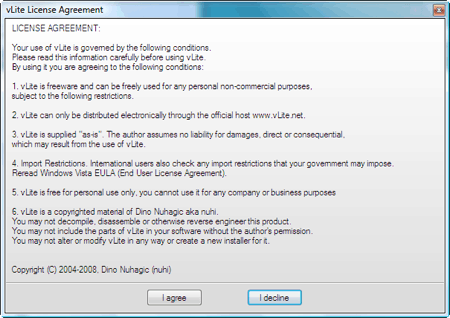
3. Accept the agreement by clicking I agree.


4. If prompted to install some Dependencies, click the Install button.


5. And now vLite will launch. A window will pop up asking where your Windows Vista install disc is located. Select the DVD drive that has your copy of Vista in it. Now click the Browse button.


6. Click OK on the Copy Files window, and then navigate to the folder you want to save your Windows Vista files in. It’s a good idea to create a new folder to save the files in - I opted for C:\Vista Backup\


7. Click OK when you’ve selected the folder.


8. Now vLite will copy your Vista disc to your hard drive. This can take some time (but probably not the 20 minutes displayed in the screenshot below).


9. Once vLite has copied all the files to your hard drive, it will analyze them to determine the copy of Vista that you’re running. The info will be displayed right below the Status section of vLite. When you’re ready, click Next.


10. Now you have to decide what exactly you want to change/add to Vista. You might as well select all of the possibilities - you don’t actually have to make changes in each section. You’ll probably want to leave Enable before apply unchecked.


11. In the first section, Integration, you can add hotfixes, drivers and language packs to your Vista install disc. This is also the place you can add SP1. If you want to include Hotfixes that you’ve downloaded from Windows Update, you can probably find them in C:\Windows\SoftwareDistribution\Download. Click Next when you’re ready to move on.


12. The Compatibility window will appear. Select each of the features you want to keep in your custom Vista install disc. If you hover your mouse over each select, you’ll see (at the bottom) what will be affected by not including a particular feature. Unless you really know what you’re doing, you’ll probably want to make sure everything is checked.


13. On the Applications tab you can select the applications you expect to use in Vista. I know for certain that I won’t be installing Halo 2, so I left that unchecked. When you’re done, click OK.


14. In the Components section you can place check marks in the boxes next to the components you do not want included on your Vista install disc. After you’ve reviewed all of the components - and there are a lot of them - click Next to continue.


15. In the Tweaks section you can enable, disable or leave as default some of the Vista settings. In the Security section of the Tweaks, you can disable AutoPlay (yay!) or change things like Hibernation, Power schemes etc.


16. Select System from the Tweaks section, and review the changes you can make. One that I appreciated was to set the Control Panel to Classic View by default.


17. If you’re absolutely sure you know what you’re doing, you can take a look at the Explorer section of the Tweaks, but I’d suggest leaving them alone. In the Internet Explorer section you can disable the IE Phishing Filter and/or the IE Phishing Verification Balloon Tips.


18. Once more, click Next. To enable Vista to install while being unattended, fill in all of the required fields. This allows for a fully automated installation - just put in the Vista installer DVD, click start, and you won’t need to interact with the installation at all.


19. Make sure to check the Regional tab if you’d like to specify a default Timezone, Keyboard layout, Time and currency format etc. Click Apply when you’re done.


20. Now you’ll be asked how you want to save the changes made to Vista. I’d suggest Rebuild one. Click OK.


21. And now watch as vLite rebuilds your version of Vista.


22. It isn’t particularly entertaining.


23. Once the process has completed, click Next.


24. From the Make bootable ISO for testing or burner screen, click Make ISO.


25. And select a location to save your new Vista ISO.


26. Watching the ISO being created isn’t much more interesting than watching the “new” version of Vista being built.


27. Once it’s done, click Exit.


28. Now burn your ISO to a DVD, and you’ll have your custom, bootable version of Vista ready to install on your PC, the next time the need arises.


Read more?
9:19 am

What's new in Microsoft Office 2010 ?

Microsoft Office 2010 (codename Office 14) is the next version of the Microsoft Office productivity suite for Microsoft Windows. It entered development during 2006 while Microsoft was finishing work on Microsoft Office 12, which was released as the 2007 Microsoft Office System.

It was previously thought that Office 2010 would ship in the first half of 2009, but Steve Ballmer has officially announced that Office 2010 will ship in 2010. The new version will implement the ISO compliant version of Office Open XML which was standardized as ISO 29500 in March 2008.

The software giant plans to offer a Web-based version of its Office productivity suite, known as Office Web that will debut with the release of Office 2010. Office Web will include online versions of Word, Excel, PowerPoint and OneNote. The next versions of Microsoft Office Visio, OneNote, Microsoft Office Project, and Publisher will feature the ribbon interface element used in other Office 2007 applications.

Builds
Earlier this year, on April 15, 2009, Microsoft confirmed that Office 2010 will be officially released in the first quarter of 2010. They also announced on May 12, 2009 at an event, that Office 2010 will begin technical testing during July. It will also be the first version of Office to ship in both 32-Bit and 64-bit versions.

New features
At present, the technical preview of Office 2010 would not be available as it will be starting from July onwards, but when Microsoft used it to show improved integration with Windows 7 at its event this week, various experts find out some of the new features of the new Office.

• The ribbon surface was introduced in Office 2007 and it is here to stay, but now the Office 2010 ribbon gets the flatter Windows 7 look. Ribbon is a form of toolbar, combined with a tab bar.

• In the new application, instead of the round Office icon, there is a button in each app that looks like the buttons for the different tabs on the ribbon, in the signature colour of that application (green for Excel, blue for Word, red for PowerPoint, yellow for Outlook and so on).

• The app windows, which were removed in Office 2007, get their window menus back. The app let you restore, move, size, minimise, maximise or close the window.

• Now with a right-click on the Outlook icon on the taskbar, user can create a new email message, appointment, contact or task, or open the inbox, calendar, contact or tasks window.


• In the new office, you can drag a file from the jump-list of any application onto the navigation pane in Outlook to create a new mail message with the file as an attachment. Outlook can automatically ignore all the replies of the messages you are not interested in.

• The company says user can create his own Quick Steps, making them sound like a combination of the Quick Access Toolbar and macros. For e.g., common tasks like filing a message, creating a meeting, marking a flagged message and deleting it at the same time. Also, user can create quick steps for things he do over and over again in Outlook.

• In new Office outlook, voice mail can be converted to the text and sent as an email. Also, it can sync text messages from a Windows Mobile 6.1 phone into user’s inbox and reply to them.

• When you reply all to messages you were BCC on, a warning is displayed on the desktop. Redmond based company claims that starting, searching and shutting down Outlook are all much faster and also promises that Outlook will run and search faster than the 2007 release.

• At present, there is no news on the next version of Office for the Mac, but the next version of Outlook Web Access will run on Safari and Firefox with all features, rather than in a Lite version.


Read more?

1:00 am

How To Choose a Laptop

Buying and using a laptop can be a liberating experience. You will have the ability to take your work wherever you go, take your computer to class, a coffee shop, on a trip - anywhere. You may end up spending a bit more for a laptop than you would for a desktop - after all, the individual components need to be smaller to fit in a laptop chassis - but the convenience is worth the extra cost.


1. Decide what screen size you need. If you are used to a larger-sized desktop monitor, you'll want to choose a laptop that has a larger screen. A 15" screen is usually standard, but there are 17" screens available, which may be worth the extra investment. Dell even offers 19" and 20" screens on certain models. If you need or want a large screen, you may want to consider this, especially if you are choosing a laptop as a desktop replacement. Also, consider if you want a wide screen monitor or a standard monitor. A wide screen monitor is good if you would like to watch movies on your laptop, or if you frequently need to have two applications open side by side.


2. Decide what kind of networking features you want. One of the most popular current features of laptops is wireless Internet access. With wireless access, you can get on the Internet wherever there is a "hotspot" - an area that the public is allowed to use an Internet signal, whether it's for a fee or free. You can also set up a home network and access the Internet anywhere in your house. Most laptops have slots for network cards, but if you want built-in network access, then make sure your laptop has a built-in network card. It's a nice feature if wireless Internet access appeals to you.


3. Determine your battery needs. You'll want to look for a laptop with a battery that lasts a long time if you will be taking your laptop on the road (or on the patio with no electrical outlet). Starting up your laptop is a big drain on a battery, and you may not get much time - perhaps only an hour or two - on a standard battery. So if you will be using your laptop away from a power source a lot, make sure that your laptop features a long battery life.


4. Look into the warranty and service plan. Computer companies and resellers have varying warranties and service plans for laptops. Some companies have you send your laptop back if anything goes wrong, some want you to take it to a service depot (which may be inconveniently located up to 50 miles away), and others will come to your home or business and repair it on the spot. Also, make sure that you can afford to wait the length of time promised for service; Dell has a great next business day plan, whereas some others take weeks to get issues resolved. If your business, school or other activities can't wait an indeterminate amount of time for resolution, make sure to get a next-day (or two day) service plan. Be sure to also check what both the warranty and the service plan cover; some cover very little, while others cover hardware and sometimes software as well. Certain warranties and service plans are voided if you spill on or drop your laptop (even accidentally), while others fully cover anything that could go wrong for any reason. Some companies offer secondary service plans if you have a drop or spill. Count on one of the two happening at some point, so consider this secondary policy if it is offered. Also check your homeowner's or renter's insurance; it may cover accidental spills and drops, so you may not need to purchase an extra service plan for that.

You may already have a favorite brand of desktop computer - it's likely that if you like a particular desktop, the same brand will produce a laptop you like. Just like a desktop, those little upgrades that seem expensive when you are buying a laptop are worth it. Whether you are looking for a laptop as your main computer or as a secondary computer for work or school, you'll love the ease and portability of a laptop. Have fun with your new computer! Oh, an check out Dell's latest Netbook, the Dell Adamo.


Quick Tips:

  • Consider what you need in terms of screen size by analyzing how you will use your laptop.
  • Decide if you want a wireless network card built in.
  • Make sure your laptop has a long battery life if you will be using it away from a power source a lot.
  • Read the warranty and service plans carefully.


Read more?
1:24 am

Windows 7 RTM Cracked With OEM License Key

Well, that didn't take long.

With every release of Windows is the inevitable race by the pirate community to crack it. Even with activation schemes, which make things considerably more challenging, hackers were able to find a way to activate Windows Vista with a special OEM key. This very same hack has now made its way to activate Windows 7 RTM.


Such a key allows OEMs to pre-activate machines – something definitely not meant for the consumer market. The OEM activation system relies on a special BIOS that identifies itself to Windows. A software hack is all that's required to fool Windows into thinking that any machine is an authorized one that can be activated using the OEM license key.


The OEM license key this time around was extracted from a Windows 7 Ultimate DVD image from Lenovo, which contained the data that hackers needed to make the activation tools.


This type of hack is particularly difficult for Microsoft to stop because it means that it would lock out and greatly inconvenience Windows 7 integration processes already underway at one of its OEM partners – in this case, Lenovo.


Microsoft wasn't able to block out the OEM BIOS hack for Windows Vista until it released Service Pack 1, leading us to suspect that the same could apply for Windows 7.


Read more?
9:22 am

Intel: First Time PC Buyers Don't Get Netbooks

Apparently, netbooks aren't the real deal.

Entry level computers for first-time computer buyers are usually inexpensive, no-frills, and usually just perform basic functions. The same descriptors could be applied to netbooks, Intel says that the little machines aren't appealing to those buying his or her first PC.


"I don't think first-time buyers are going to buy netbooks," Sean Maloney, Intel's general manager of sales and marketing, Intel Technology Summit on Wednesday in San Francisco, quoted by Reuters. "The first time you buy something you want the real deal. It's consistent not just in China, but all around the world."


"Netbooks are predominantly... a second or third purchase from someone who's already got a notebook," he said, according to Engadget. "The first time you buy something, you want the real deal. It's a human behavior thing... it's [the same] all around the world."


"If you're going to spend your hard-earned money for the first time, you're going to put a computer in your house," Maloney added.


This doesn't represent any change in stance at Intel, as it always maintained that netbooks were always a supplementary purchase for those who already owned a computer.


Netbooks are adequate machines for those only looking from a computer the ability to surf the internet and email – and this represents a large portion of internet users. Regardless of whether or not netbooks are attractive or viable first PC purchases, Intel's probably going to be pleased as long as it's one of its chips.


Read more?
12:32 am

7 things to do after installing kubuntu

I installed Kubuntu and tried it for few days, here are some tips for you if you are planning to instal Kubuntu. Kubuntu is the distant cousin of Ubuntu and uses KDE as its desktop environment. Canonical doesn't pay as much attention to Kubuntu, Kubuntu is generally regarded as one of the worst KDE based distros. I've heard that OpenSuse is a better option to try KDE. Here are few quick things to setup in Kubuntu:

1. Install Flash 10
To install the official Adobe Flash plugin (Flash 10) for Firefox, install the adobe-flashplugin package:

sudo apt-get install adobe-flashplugin

2. Install Java 6.0
sudo apt-get install sun-java6-jre sun-java6-plugin

3. Install GIMP: I don't know why KDE doesn't ship with GIMP. It is obviously the best image editor other than Photoshop. One of the reasons for this could be that GIMP is an GTK based app.
sudo apt-get install gimp
Initially GIMP will look ugly but we can change that easily later on.

4. Turn off Wallet: The wallet must be one of the most irritating thing ever made for PC. It keeps on nagging for your password after every 5 min. So here is how you stop it.
K Menu > Applications > Settings > Wallet Management
Now look in your System Tray (it is normally at the extreme right side on your panel) for one brown colored icon. Right click on it and select configure wallet and then uncheck Enable KDE wallet subsystem.


5. Play DVDs:
sudo apt-get install libdvdcss2

if this doesnt work for some reasons use this command:
sudo /usr/share/doc/libdvdread3/install-css.sh

6. Make GTK Apps Beautiful: If you try installing Gnome apps like GIMP, Firefox in KDE they will look ugly because they are based on GTK. To make them look like a normal (and beautiul) KDE app type this in a terminal:
sudo apt-get install gtk-qt-engine-kde4
Now got to K Menu > System Settings > Appearence > GTK Styles and Fonts

Here select the option Use my KDE style in GTK applications
also select Use my KDE fonts in GTK applications

Now your Gnome apps will start looking pretty too. After using the above settings my GIMP started looking good before using that GIMP looked like some Windows 98 software :P
[thanks Tombuntu]

7. Add Avatar: You can add cool avatars for your account.
Go to Settings > About Me > Password and User Account

Well KDE 4.1 motto says 'Don't look back' well I have decided that from now on I won't ever try KDE. On the very next day Plasma crashed and I had to reinstall Ubuntu.


Read more?
8:35 am

Civil Servants Want Bonus Incorporated In Service Scheme

KUALA LUMPUR, July 15 (Bernama) -- The Congress of Union Employees in the Public and Civil Service or Cuepacs, is seeking to incorporate the bonus element in the service scheme of civil servants to ensure it is paid annually.

Currently, bonus is paid at the discretion of the government based on its ability to pay, unlike in the private sector where it is an annual practice.

In good times, the 1.2 million civil servants have enjoyed a bonus of a month's salary or a minimum of RM1,000.

The congress is also proposing that the interest rate on housing loans be reduced from the current four per cent to one per cent annually.

These are among Cuepacs' new proposals to the government, as part of its review of the service conditions of civil servants, in a memorandum to be submitted to Prime Minister Datuk Seri Najib Tun Razak soon.

Cuepacs sources told Bernama today that the memorandum -- approved by the congress' general council meeting in Ipoh recently -- would also seek to change the "golden hand shake" payment from the present maximum 150 days to the actual number of unused leave the officers had accumulated.

The "golden hand shake" is monetary payment for unused leave accumulated by an officer throughout his government service.

Another major change Cuepacs is seeking is in the calculation of pensions.

It is proposing that the present pension formulae based on the last drawn basic salary be changed to also include all allowances.

What this means is that when calculating the pension, all housing, cost of living, meal, mileage, driver, hardship and entertainment allowances should also be added to the last drawn basic salary.

Cuepacs is also seeking a new benefit in the form of leave to look after a sick child, with the duration depending on the length of the sickness.

Another new benefit it wants is reimbursement for dental implants and eye treatment.

On the various service schemes, it wants the present matrix promotion system to be replaced with a linear system, with additional five incremental steps.

It also wants to create a sub-professional scheme for diploma holders.

The sources said Cuepacs leaders were optimistic that the government would consider their proposals with an "open mind".

"We realise that the proposals, if accepted in toto, will increase the administrative cost of the government tremendously, but what we are hoping is that our request be met in stages," they added.

-- BERNAMA


Read more?
11:07 pm

Just a nine months after the Apple [AAPL] iPhone App store launched, Apple announced that they had hit 1 Billion application downloads from the App Store, today they have hit another milestone with a massive 1.5 Billion downloads.


“The App Store is like nothing the industry has ever seen before in both scale and quality,” said Steve Jobs, Apple’s CEO. “With 1.5 billion apps downloaded, it is going to be very hard for others to catch up."

That is a serious amount of downloads, although it is still not clear how many of the downloads are for paid apps and how many are for free Apps.

The 1.5 Billion downloads is still very impressive, and Apple have sold a total of over 40 million iPhones to date.

Press Release


Read more?
10:50 pm

The Brand Keyboard

Here is an interesting keyboard design from designer Ignacio Pilotto, which rather than featuring the alphabet it features brands replacing each letter.

"The repetition of the logos used by the advertising psychology, causes us to systematically recognize the brands, getting us to recognize the logos rather than our own alphabet."

It certainly is an interesting idea, it would probably take me a while to learn how to type on this thing, as I still spend most of my time looking at the keys when I am typing.


Read more?
1:01 am

PIKOM PC Fair 2009 (II)


PIKOM PC FAIR 2009 (II) LAUNCH ALERT (click here)

31 July - 2 August 2009 (11:00am - 9:00pm)
· KL Convention Centre, Kuala Lumpur - Kuala Lumpur City Centre, 50888 Kuala Lumpur
· Village Mall, Sungai Petani - Kedah
· Dewan Perbandaran Taiping - Perak
· Batu Pahat Mall, Batu Pahat - Johor
7 August - 9 August 2009 (11:00am - 9:00pm)
· Penang International Sports Arena, Penang - Jalan Tun Dr Awang, 11900 Relau
· Mahkota Parade Melaka, Melaka - Jalan Merdeka, 75000 Bandar Hilir
· Sabah Trade Centre, Kota Kinabalu - Sabah
· Berjaya Megamall, Kuantan - Pahang
13 August - 15 August 2009 (11:00am - 9:00pm)
· KB Mall, Kota Bharu - Kelantan
· Terengganu Trade Centre, Kuala Terengganu - Terengganu
14 August - 16 August 2009 (11:00am - 9:00pm)
· Persada Johor International Convention Centre, Johor Bahru - Jalan Abdullah Ibrahim, 80000 Johor Bahru
· Stadium Indera Mulia, Ipoh, Perak - Jalan Ghazali Jawi, 31400 Ipoh


Exhibitor Information - Venue Layouts


Read more?
1:00 am

KL Wedding Expo 2009

Do not miss this great opportunity to participate in
the city's most established wedding exposition.

The KL Wedding Expo is the best platform to promote wedding services to Malaysian pre-nuptial couples. In order to make sure that the quality of the exhibition for both exhibitors and visitors remained at the customary high standards like our past shows, the organizer will meticulously inviting the rare breed of high caliber wedding suppliers that visitors will hardly be able to meet them in any other typical bridal fair and gather them all under one-roof.

The Exhibition :
9th KL Wedding Expo 2009
Venue :
Hall 3, Level 3, Mid Valley Exhibition Centre, Kuala Lumpur, West Malaysia.
Date :
10th - 12th July 2009
Time : 11:00am - 9:00pm
Admission : Entrance is FREE
Major Exhibit : Bridal Boutique, Beauty & Health, Bakeries & Culinary Services, Décor & Rentals, Gift & Premium, Fashion & Flowers, Fashion Jewelries, Hotels & Restaurants, Honeymoon & Travel, Photography & Videography, Publications & Printing services etc.


Read more?
6:54 am

Megan Fox Apologizes for Snubbing Child's Rose

Kodak is offering $5,000 to the first person to identify the boy who unsuccessfully tried to hand a rose to Megan Fox as she was whisked down the red carpet at the London premiere of Transformers: Revenge of the Fallen. Fox has since apologized, saying she didn’t see the young fan - and Kodak has offered to arrange a rose exchange. Send an email to yellowroseboy@gmail.com if you have any info or can help turn the rose boy’s dreams into reality.


Read more?
1:59 pm

More Heroes at Comic Con Info, Claire’s College Set Pics

So are the guys of Heroes attending Comic Con ‘09 or not? We’ve heard a lot of mixed messages from the crew, in particular producer Tim Kring, but hopefully this will clear it up. According to E! Online, they have gotten confirmation from NBC that Heroes will now front a small panel on Saturday, with Tim Kring and some of the cast (but not all of them) attending. So there you have it.

Meanwhile, more set pics from Heroes Season 3 with Claire and her new college roommate, new castmember Madeline Zima, playing Claire’s roommate, Gretchen (via):


Read more?
7:10 am

Zune HD versus iPhone 3.0?

Next week we expect to hear announcements about the iPhone 3.0 release. We have some of the basic knowledge points already but if Apple is up to their usual ways, there will be some surprises - and we're looking to see/hear what they are.

BTW, we're hoping Microsoft is holding a few aces up her sleeve as well when she releases the Zune HD. How cool would that be?

Obviously (at this point), since we're pretty sure no Zune Phone is coming, a comparison between the Zune HD and the iPhone isn't fair - it really is more of a Zune HD versus iPod Touch question but … the question is this …

Will the Zune HD grab any market share away from the iPhone (or iPod Touch) 3.0?


Read more?
3:43 pm

Celeron Scorches Past 8GHz, Second Highest Clockspeed Ever Achieved

There's a reason Intel's Celeron line has consistently proven popular among overclockers. Out of CPU-Z's top 20 list of highest clocked CPUs, Celeron chips -- most of them of the Celeron 347 variety -- occupy 12 spots, or 60 percent of the list. And recently setting a new record for the No. 2 spot, Belgian overclocker 'Blind' from Madshrimps pushed his Celeron 352 chip (Cedarmill core) to 8.116GHz.

In order to ramp up that high, Blind used the Dragon F1 Extreme Edition LN2 cooler with gum filling the gaps around the socket to prevent condensation. It took nearly 1.9V to coax the Celeron past 8GHz, well above its stock 1.3V rating.

Such high voltages and extreme cooling methods limit the usefulness to chasing overclocking records as opposed to any kind of day-to-day operations, but we'll admit to being impressed at seeing a 3.2GHz Celeron achieve almost a 5GHz OC. And hey, reaching 5.7GHz on air isn't too shabby either.

Plenty of pics and more info here.


Read more?
10:37 am

New iPhone in June?

Apple has a habit of refreshing its iPod and iPhone-type products on a pretty regular schedule, so a new iPhone in June really wouldn't be the surprise of the century, but now we've got word to that effect from the United Arab Emirates. Etisalat is picking up the iPhone 3G over there, along with providing support for existing iPhones sold on the gray market, but the writeup in Business 24/7 makes mention of a brand new iPhone hitting in June, which Etisalat will also get at launch. This could easily be a misunderstanding on the part of the reporter, a misquote, or a combination of signs, portents and omens, but it's certainly an interesting little tidbit. We'd have to think that anyone liable to get this story right would also be aware that a brand new iPhone would be worth more than a passing reference, but we suppose we'll just have to wait and see. Apple Insider also mentions rumblings of an upcoming iPhone having a fairly significant architecture overhaul -- that's mostly conjecture at this point, but might make sense (or room) for an iPhone nano. And you know how we love the iPhone nano.


Read more?
7:33 pm

Camilla Belle Hottest in Elle Italia Magazine - May 2009

Camilla Belle Routh, better known simply as Camilla Belle (born October 2, 1986), is an actress. Some of her works include The Lost World: Jurassic Park, When a Stranger Calls and 10,000 B.C. She has dual US-Brazilian citizenship.

Checkout Here Camilla Belle is posted on Elle Magazine Italy for the month of May 2009.


Read more?
9:10 pm

Muslim woman appointed as Obama's advisor


USA, the land of opportunities, keeps on proving the great values which form basis of it's greatness. It's true that United States of America isn't great in all respects, only Guantanamo Bay is enough to validate this fact. However, it's also a fact that it's values, which it continues to practice and strengthen are phenomenal.

I quite remember those words of Obama in which he described his struggle as a continuance of what Rosa once sat for and what Martin once walked for and he ended with quite an optimistic words, something that he and the people of America always keep on proving by virtue of their acts.

Dalia Mogahed, an Egyptian-born American, has been appointed to a position in President Barack Obama's administration becoming the first Muslim woman to have this honor. She would be advising President Obama on prejudices and problems faced by Muslims. The Muslim world, including the Islamic Republic of Pakistan, has welcomed this move.

We, the Muslims, hope that this will help paving a way towards inter-faith dialogue and harmony.

The Egyptian-born American who heads the Gallup American Center for Muslim Studies, a non-governmental research center providing data-driven analysis on the views of Muslim populations around the world, became the first Muslim veiled woman to be appointed to a position in the White House.
"I am very honored to be given this opportunity to serve my country in this way," Mogahed, who will be Obama's window into the Muslim American community, told media.


Read more?
7:29 pm

Multi-processor support coming for Firefox


The project, which lacks a catchy name like other Mozilla projects (like TaskFox, Ubiquity, or Chocolate Factory) is coordinated by long time Mozillian, Benjamin Smedberg; and also integrated by Joe Drew, Jason Duell, Ben Turner, and Boris Zbarsky in the core team.According to the loose roadmap published, a simple implementation that works with a single tab (not sessions support, no secure connections, either on Linux or Windows, probably not even based on Firefox) should be reached around mid-July. Phase II will deal with the interactions between the two process types (chrome and content), and is aimed for November.Phase III will take on adapting the APIs for extensibility, accessibility, and performance. By this time (not even guesstimated), we could see a release to play with. Finally, Phase IV will extend the previous development to support several content processes at a time. Security sandbxing will be covered in a later phase.So it seems we won’t see a multiprocess Firefox for at least a year or so. However, some decisions like taking Chromium’s networking stack to replace Necko, could accelerate the process. As you may know, Chromium is the open source version of Google’s Chrome.Another consideration is that changes would come at the platform level, so in reality, any Mozilla-based application would be able to create independent processes when web content rendering is required.


Read more?
12:32 pm

Intel launches new chip logos, rating system

Intel has revamped its processor badging and rating system. Consumers are the main target, though business systems will get new badging too.

The new badges include a die (the chip minus the packaging) accent in the upper right hand corner, a prominent main brand (e.g., "Core"), and the modifier (e.g., "i7").

Intel has also instituted a star system that rates chips from five stars (best performance in class) to one star (lowest performance). "So when a consumer goes into a Best Buy store they can distinguish between Centrino, Core, Celeron, Core 2 Duo, Core 2 Quad," said Intel spokesman Bill Calder.

That may be a little easier said than done, however. Some consumers (but not including "tech savvy" Giampaolo, of course) will still need help from the sales person to decipher the badging. A daunting challenge in the case of consumer laptops, which are typically plastered with a hodgepodge of stickers from Intel, Nvidia, Advanced Micro Devices, AMD's ATI graphics chip unit, and other companies.

Intel is in the process of moving to a "pretty aggressive brand simplification plan," Calder said. "When we launched Core i7, we said we're moving to a single primary client brand, which is Core. We're moving in that direction," he said.

The Atom processor will not get a modifier. In the future, the Nehalem server processor, currently branded only as "Xeon" with a letter and number suffix, may also get new branding to make it more readily identifiable as part of the Nehalem architecture like its desktop sibling the Core i7, Calder said.

New Intel processor badges with die accent

New Intel processor badges with "die" accent

(Credit: Intel)


Read more?